
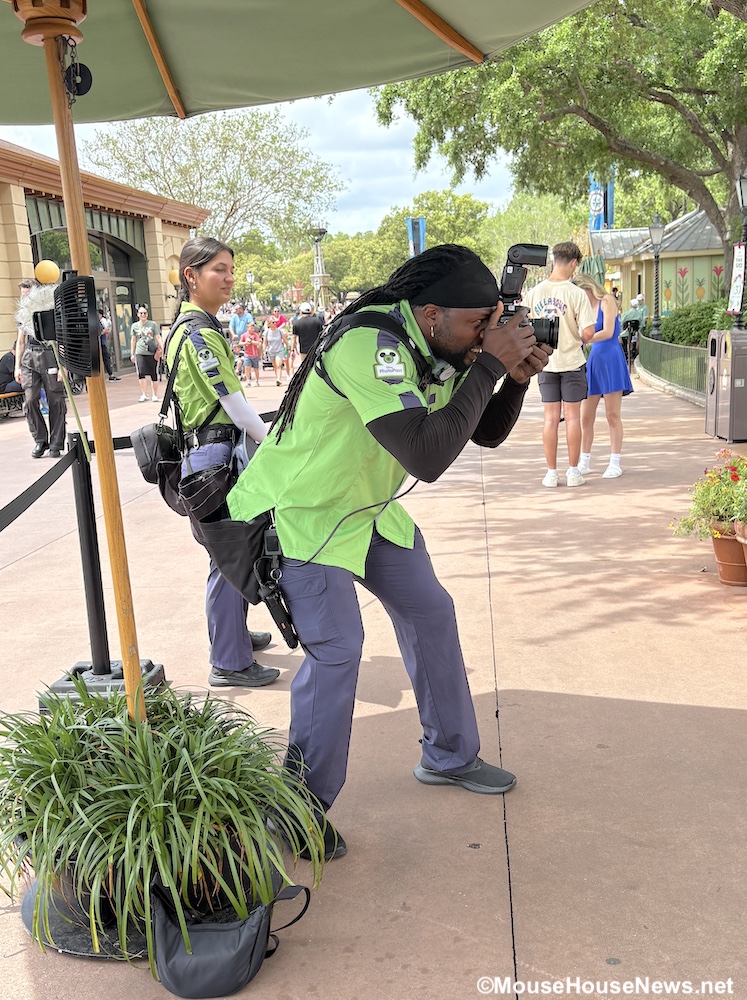
A picture is worth a thousand words. Whether you’re scrolling through your camera roll or flipping the pages of physical photo album, photos can instantly transport you back to the magic of your Disney vacation. In fact, I’d argue that pictures are one of the best souvenirs out there (right along with Minnie ears and pressed pennies, of course).
Disney PhotoPass Service
A Disney World vacation offers plenty of picture-perfect opportunities to create lasting memories. Disney offers a photography service called Disney PhotoPass that makes capturing those memories even easier! You can find PhotoPass photographers stationed throughout all four theme parks and at select Disney Resorts Collection Hotels.
Taking photos with a Disney PhotoPass photographer is a convenient way to get everyone in your group into the picture. That’s just one of the reasons the MouseHouseNews.net team loves Disney PhotoPass! You can use your My Disney Experience app to locate over 150 PhotoPass locations. Let the treasure hunt begin!

Magic Shots
In addition to standard photos in front of iconic backdrops, PhotoPass can also add a bit of extra magic into your photo with Magic Shots. There are several different forms of Magic Shots. The most commonly available one involves digitally adding special backgrounds or characters into your photo. Don’t worry, your photographer will give guidance in how to pose for these surprise elements! Other Magic Shots you may come across include Tiny World and Super Zoom Magic Shots.

Character Interactions
While taking selfies with characters is fun, sometimes you may want other photos from your interactions too. This is where Disney PhotoPass comes in! PhotoPass photographers are available at select character meet-and-greet locations as well as some character dining locations. Being able to concentrate on enjoying your interaction while the photographer catches those unique moments is priceless! Bring on the Pooh Bear and Mickey Mouse hugs!

Attraction Photos
One of the most important photo categories you can bring home: the attraction photo. After all, without a photo, did it really happen? Prove to everyone back home that you really did ride exciting attractions like Tower of Terror, Rock ‘N’ Roller Coaster Starring the Muppets, Guardians of the Galaxy Cosmic Rewind, etc. We’ve got a full list of attractions currently offering ride photos in case you want to learn more. Some attractions even offer videos too!

How To Link Photos To Your Account
It’s pretty simple to link your PhotoPass photos to your My Disney Experience account. When you have photos taken by a PhotoPass photographer, he or she will ask to scan your MagicBand, MagicMobile, or PhotoPass card to link your photos. That’s all there is to it!
On most attractions, photos linked automatically using your MagicBand’s RFID technology or having Bluetooth enabled for the My Disney Experience app on your phone. Just note that some attractions still require you to scan a MagicBand, MagicMobile, or PhotoPass card on kiosks at the exit. Keep your eyes peeled for these photo preview walls when exiting rides including Space Mountain, Test Track, Buzz Lightyear’s Space Ranger Spin, and a few others.

What Happens When A Photo Is Missing?
In general, photos link seamlessly and you don’t have to take any additional action. You can view your photos in your My Disney Experience app’s photo gallery. Disney does caution that not all photos will show up in your account immediately. However, most photos will show up in your account within a few hours. The photos that usually take longer to appear are attraction photos and Magic Shots.
Disney requests waiting 24 hours for a photo to show up in your gallery. However, if the photo is still missing once 24 hours has passed, all hope isn’t lost. I experienced this situation with a ride photo from Tiana’s Bayou Adventure recently (and that ride was definitely one I wanted to commemorate!). Don’t worry, Disney PhotoPass Support is there to help! There is a simple process you can follow to report a missing photo. Let’s talk about it!

First Steps to Photo Recovery
If you notice a photo is missing from your gallery, you will first need to make sure that any separate media like PhotoPass cards or MagicBands are linked to your account. If linking takes care of the issue, great! However, if everything is linked properly and photo(s) are still not showing up, you can contact PhotoPass Support to report the missing photo(s).
The easiest way to contact support about a missing photo is right in the My Disney Experience app. You can access the support link from within your photo gallery or under the “Help & Feedback” section of the app. Once you’ve tapped to access PhotoPass Support for a missing photo, there are a couple of steps to complete.

First, it’s important to point out that for most guests, photos are available in your gallery for 45 days. The deadline is based not only on the date but also the actual time that the photo was taken. To avoid photos disappearing due to expiration, don’t wait too long after your trip to download them. In some situations, PhotoPass Support can offer a one-time per calendar year extension for expired photos. It doesn’t hurt to reach out and ask!

Contacting PhotoPass Support
After verifying your account is linked and whether or not photos have expired, you can contact PhotoPass support for additional assistance. The easiest way is through the My Disney Experience app. Here’s how:
- Tap on the hamburger menu in the lower right corner
- Scroll to the Help & Feedback section, then tap Help
- Tap Missing PhotoPass Photos
- Tap on “Contact Us”
- Choose “My Photos and Memory Maker” from the list
- Select “Missing Photo” under topics (or “Expired Photo” if that is your situation)
- There will be a form to fill out. The form requests information that will help support (hopefully) locate your missing photo. You’ll provide basic information including where the photo was taken, the date and approximate time, and a basic description of the people in the missing photo. Disney does ask you to upload an image of the guests in the photo (if possible). It’s particularly helpful if you have a photo from the day the missing photo was taken.
- Once you’ve repeated the process for any other missing photos, you can hit the “submit” button.
You will receive an email confirmation about your request. Here is where you exercise patience, because the response time may vary. Hopefully, it won’t take more than a few days for the Guest Support team to locate your missing photo!

Hooray! Support Found Your Photo
In cases where your photo is successfully located, you’ll receive a follow-up email. You should see the photo in your gallery within 12 hours of receiving the email. If you still don’t see it, you can respond to support to let them know. In my experience, I also received a push alert from the app letting me know there was a new photo in my gallery. Once your photo is in your gallery, go ahead and download it! Then, enjoy your photo and share it with all of your family and friends!

Purchase Memory Maker To Download Them All
You can, of course, purchase photos individually. However, to download and save all of the PhotoPass photos from your trip for one set price, you may want to consider purchasing Memory Maker. There are currently three Memory Maker packages from which you can choose:
- Memory Maker Advanced Purchase – priced at $185
- If you purchase Memory Maker at least 3 days in advance of your vacation, you can save $25 off of the regular price. You will receive all photos and videos taken within 30 days of activation. Memory Maker does not include any photos taken within 3 days of the purchase. You must purchase those photos separately.
- Memory Maker – priced at $210
- This package allows you to receive all photos and videos taken within 30 days of activation.
- Memory Maker One Day – priced at $85
- If you choose this option, you will receive unlimited digital downloads of all of your photos and videos from one day of your choosing.
Your Memory Maker purchase entitles you to an unlimited number of downloads of every photo and video captured during your vacation. You can even download photos for up to 25 people from your friends and family list. They just need to have sharing enabled and have had their photos taken during your 30-day Memory Maker window.

Concluding Thoughts
As I stated in the beginning, I’m a huge fan of taking PhotoPass photos to remember all of those magical memories. I highly recommend taking the time to stop and see what kinds of photos you can get. If you find yourself in a situation where you don’t see one of those precious photos in your photo gallery, support is there to help! For more Disney World tips, suggestions, and reviews, stay tuned to MouseHouseNews.net. We’ll see you real soon!